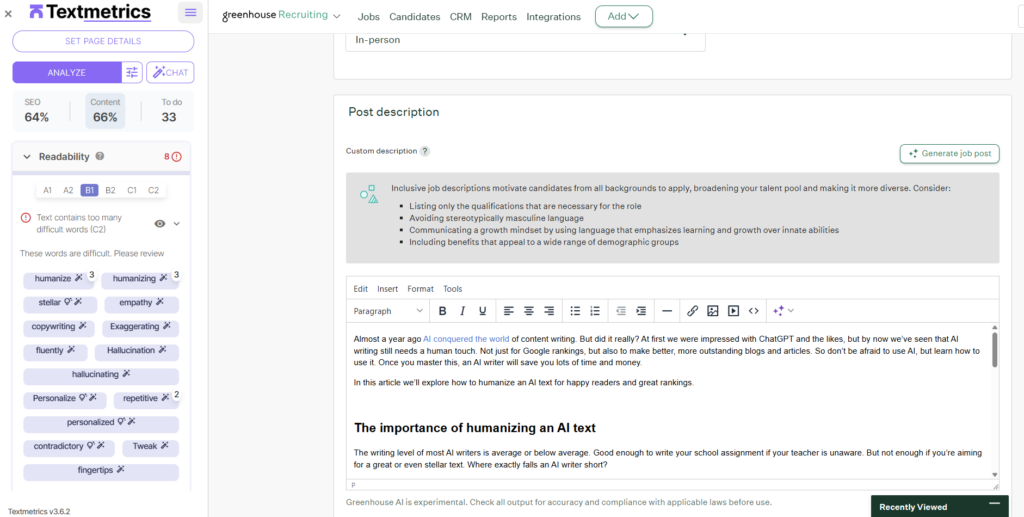
The Textmetrics integration helps you create stronger, clearer, and more inclusive job ads directly in Greenhouse. With the Textmetrics browser extension for Google Chrome or Microsoft Edge, you can receive real time writing feedback while editing your job descriptions, making it easier to attract a broader and more diverse group of candidates.
The setup is quick and user friendly, simply install the extension, log in with your Textmetrics account, and start optimizing your job ad text right away. Textmetrics analyzes only the job title and job description content in Greenhouse and provides instant suggestions to improve readability, tone of voice, and inclusivity, without requiring any complex technical implementation.
Configure the Textmetrics integration
To configure Textmetrics integration, you’ll need the latest Google Chrome or Microsoft Edge browser and a Textmetrics account. If you don’t have an account, please contact your account manager.
Step 1 – Install the Textmetrics extensionOpen the Chrome web store or Edge Add-ons store and search for ‘Textmetrics’, or use the integration button.
Press the ‘Add to Chrome’ or ‘Get’ button. Open the Extensions menu and select ‘pin Textmetrics’. Click on the Textmetrics icon to launch the extension.
Step 2 – Log into the Textmetrics extension
Launch the Textmetrics extension. Enter your username and password. Click ‘Sign in’.
Use the Textmetrics integration
The Greenhouse Recruiting integration works with our Textmetrics extension.
The Textmetrics extension will only see the text of the job ad, taken from a predefined set of editors in Greenhouse. The extension works in the front-end, so there is no deep technical integration in the Greenhouse system, so the extension does not have any access to other parts of Greenhouse/accounts/etc.
To be able to use the extension, the user will need to login to the extension with a Textmetrics account; for this account we store the email address, firstname and lastname of the user.
When working with the extension, no content is stored on Textmetrics servers. In this case the plugin/integration sends the content to the Textmetrics API, analysis is done in memory and the results are returned. No content is stored on our servers.
The content sent to our servers consists of Job title and detailed description from Greenhouse.
Additional resources
For additional information not covered here, reach out to Textmetrics Support at support@textmetrics.com or contact your Textmetrics account manager.